Skip to content

The voice stats bot for Discord

Turn voice chat into leaderboards, levels and streaks

ODIN keeps score of the time your community spends in voice: leaderboards, XP and levels, daily streaks, who plays with whom and what they play. Use it in Discord, and on a members-only dashboard for your server.

  • Asks for no permissions
  • Never reads messages or listens in
  • Off until an admin turns it on
  • Members can opt out
odin.synstick.com/dashboard

Voice time, 7 days

Your rank: #4, 22h 5m

  1. Rank 1
    NovaLv 20
    Up 1 place38h 12m
  2. Rank 2
    KestrelLv 17
    Down 1 place31h 45m
  3. Rank 3
    JuniperLv 13
    No change27h 20m
  4. Rank 4
    RookLv 10You
    Up 2 places22h 5m

Rook used /voicetimeframe: Last 7 Days

ODINAPP

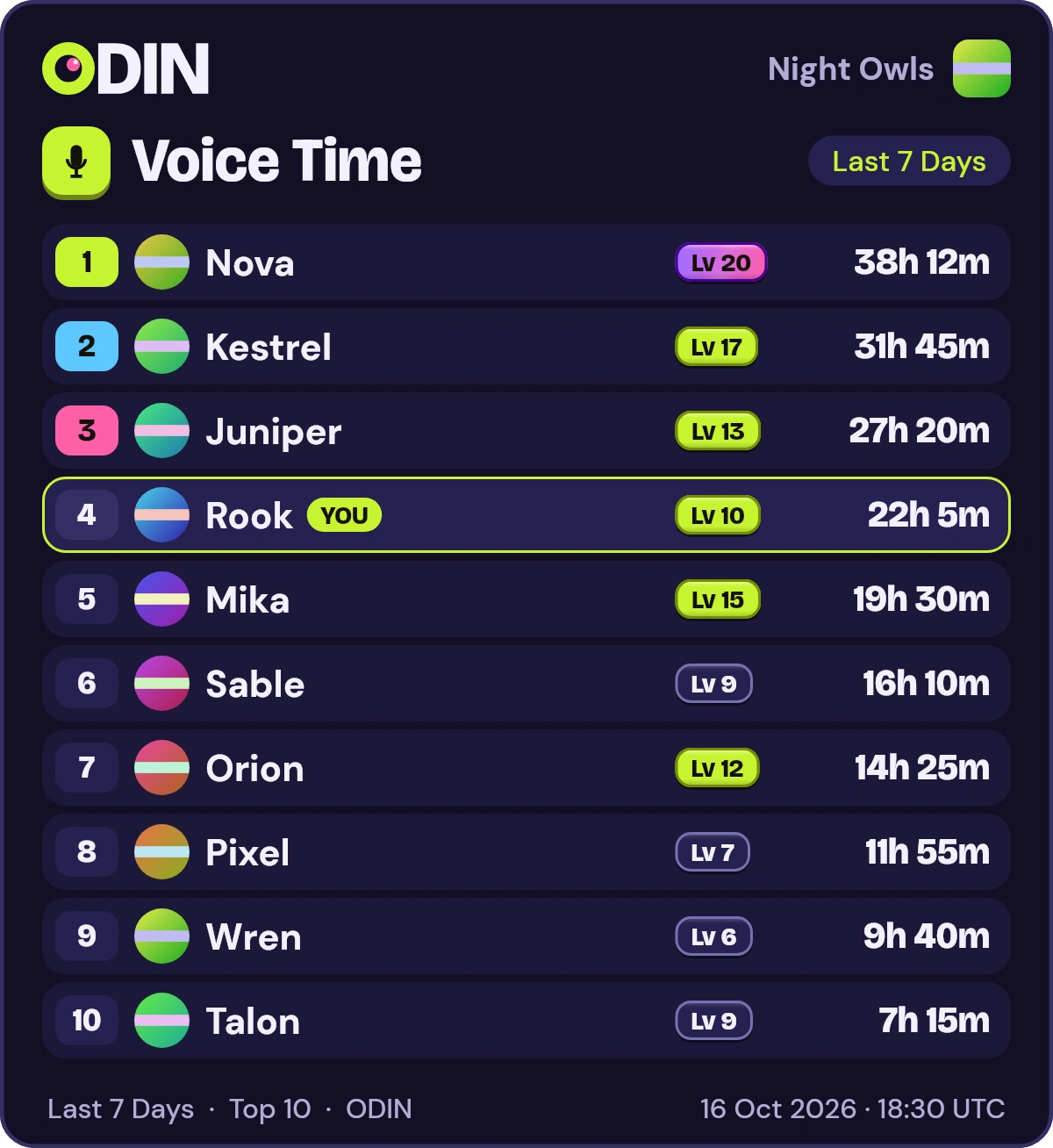
ODIN's /voice picture reply: Voice Time for Night Owls, a made-up server, Last 7 Days. Rows: 1. Nova, 38h 12m, Level 20; 2. Kestrel, 31h 45m, Level 17; 3. Juniper, 27h 20m, Level 13, and more. Your own row, Rook at #4, is marked YOU.
Voice time, 7 days
207h
Up +12%vs the previous 7 days
Voice time per day, last 14 days (UTC)
DayVoice time
2026-10-0226h 51m
2026-10-0333h 36m
2026-10-0432h 13m
2026-10-0520h 13m
2026-10-0621h 48m
2026-10-0723h 43m
2026-10-0826h
2026-10-0928h 56m
2026-10-1036h 19m
2026-10-1134h 54m
2026-10-1225h 43m
2026-10-1327h 38m
2026-10-1425h 36m
2026-10-1528h 6m
Sample dataA leaderboard, an answer from ODIN and a stats card for Night Owls, a made-up server.

Lives right inside Discord

Slash commands right inside your server. The boards answer in the channel, so everyone sees them.

Voice leaderboards

See who really lives in voice

Rank your server by time in voice over the last 24 hours, 7 days, 30 days or all time. Run /voice in Discord for the top 10, or open the full leaderboards on the dashboard.

  • Four windows: 24 hours, 7 days, 30 days and all time
  • Rank arrows show who moved up or down
  • Search for any member and find your own position

Explore Voice leaderboards

odin.synstick.com/dashboard

Voice time, 7 days

Your rank: #4, 22h 5m

  1. Rank 1
    NovaLv 20
    Up 1 place38h 12m
  2. Rank 2
    KestrelLv 17
    Down 1 place31h 45m
  3. Rank 3
    JuniperLv 13
    No change27h 20m
  4. Rank 4
    RookLv 10You
    Up 2 places22h 5m
  5. Rank 5
    MikaLv 15
    Down 1 place19h 30m
  6. Rank 6
    SableLv 9
    Up 2 places16h 10m
  7. Rank 7
    OrionLv 12
    Down 2 places14h 25m
  8. Rank 8
    PixelLv 7
    Down 1 place11h 55m
Sample dataThe voice leaderboard of Night Owls, a made-up server, for the last 7 days.

Levels and XP

Every second in voice earns XP

Members earn 1 XP for every second in voice, and XP raises their level. XP is lifetime and never goes down, so a level is a record of time well spent.

  • No daily cap on voice XP, with rates and multipliers you set
  • Timed seasons with their own boards and badges
  • Check /levels and /xp in Discord
  • See the distance to the next level on the dashboard

Explore Levels and XP

Kestrel

Level 17Member of Night Owls

Level 17

2,514,000 XP total

Level 17: 2,291,200 XPLevel 18: 2,586,550 XP

72,550 XP to level 18, about 20h 9m of voice time

1 XP for every second in voice
LevelVoice time neededXP
Level 2about 2.5 hours8,950 XP
Level 5about 40 hours143,200 XP
Level 10about 201 hours724,950 XP
Level 20about 897 hours3,230,950 XP
Level 50about 5,969 hours21,488,950 XP
Sample dataA member of Night Owls, a made-up server, and the voice time each level takes.

Voice streaks

Give people a reason to come back tomorrow

Spend at least 10 minutes in voice on a UTC day to keep a daily streak alive. Miss a full day and it ends, but your best streak always stays on the record.

  • /streaks lists the longest current streaks
  • An 84-day calendar shows every streak day
  • Streak history lists runs of three days or more

Explore Voice streaks

Nova

Member of Night Owls

Current streak
14 days
In a row, up to today
Best streak
31 days
It never goes down

A streak day is a UTC day with at least 10 minutes in voice.

Sample dataA member of Night Owls, a made-up server, and their last 84 days in voice.

Duos, trios and quads

Find the friends who always show up together

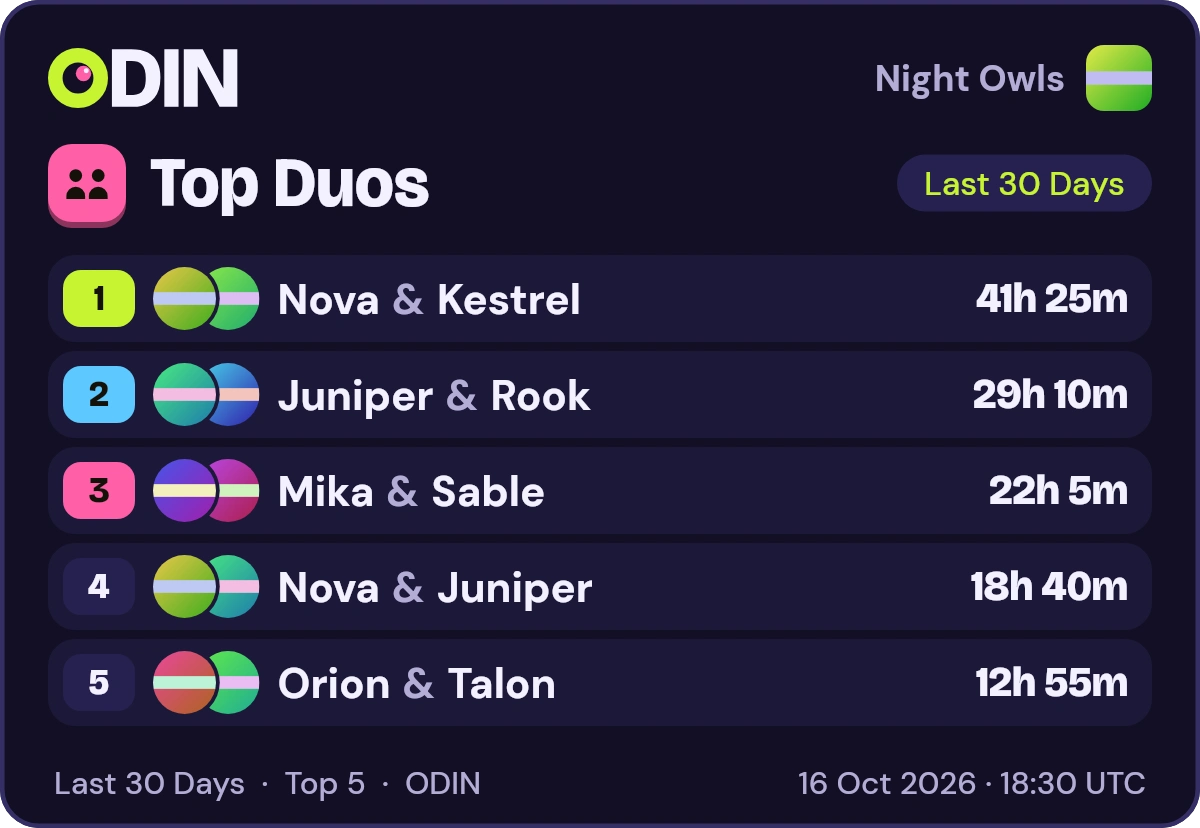
ODIN adds up the time that pairs and small groups spend in the same voice channel, then ranks them. Run /duos, /trios or /quads to see the top groups over the last 7 days, 30 days or all time.

  • Pairs, groups of three and groups of four
  • Counts only time spent in the same channel together
  • Never shows a group with someone who opted out

Explore Duos, trios and quads

Rook used /duostimeframe: Last 30 Days

ODINAPP

ODIN's /duos picture reply: Top Duos for Night Owls, a made-up server, Last 30 Days. Overlapping avatars, the names joined by &, and the time spent together. 1. Nova & Kestrel, 41h 25m; 2. Juniper & Rook, 29h 10m; 3. Mika & Sable, 22h 5m; 4. Nova & Juniper, 18h 40m; 5. Orion & Talon, 12h 55m.
Sample dataODIN's answer to /duos in Night Owls, a made-up server.

Game stats

See what your server plays

Run /games to see which games your members play most, ranked by total play time, with the number of sessions, over the last 24 hours, 7 days, 30 days or all time. It lists titles and never names a member.

  • Counts a game while a member's status says Playing
  • A title is listed once three members have played it
  • Switched on with /odin enable, together with voice tracking

Explore Game stats

Rook used /gamestimeframe: Last 30 Days

ODINAPP

Night Owls

🎮 Top Games

  • 🥇Starfall Arena — 41h 20m · 37 sessions
  • 🥈Pixel Kart — 33h 5m · 52 sessions
  • 🥉Mossy Mines — 28h 40m · 19 sessions
  • 4️⃣Cozy Farm Days — 22h 15m · 24 sessions
  • 5️⃣Comet Couriers — 17h 50m · 31 sessions
  • 6.Lantern Quest — 14h 30m · 12 sessions
  • 7.Mech Meltdown — 11h 5m · 16 sessions
  • 8.Tiny Tavern Tycoon — 8h 45m · 9 sessions
  • 9.Skyline Racers — 6h 20m · 14 sessions
  • 10.Dungeon Delvers — 4h 10m · 7 sessions

Last 30 Days · Top 10 · ODIN

Sample dataODIN's answer to /games in Night Owls, a made-up server, with made-up titles.

Server stats

A dashboard for the whole server

Log in with Discord to open the stats of every server you share with ODIN. Only members of a server can see its numbers.

  • Voice time trends against the previous period
  • Busiest times by weekday and hour of the day
  • Records and a profile page for every member

Explore Server stats

odin.synstick.com/dashboard

Server stats

Night Owls

Voice time, 7 days
207h
Up +12%vs the previous 7 days
Voice time per day, last 14 days (UTC)
DayVoice time
2026-10-0226h 51m
2026-10-0333h 36m
2026-10-0432h 13m
2026-10-0520h 13m
2026-10-0621h 48m
2026-10-0723h 43m
2026-10-0826h
2026-10-0928h 56m
2026-10-1036h 19m
2026-10-1134h 54m
2026-10-1225h 43m
2026-10-1327h 38m
2026-10-1425h 36m
2026-10-1528h 6m
Active in voice, 30 days
12
Up +9%vs the previous 30 days
People in voice per day, last 30 days (UTC)
DayPeople in voice
2026-09-164
2026-09-175
2026-09-185
2026-09-198
2026-09-208
2026-09-214
2026-09-224
2026-09-235
2026-09-245
2026-09-256
2026-09-268
2026-09-276
2026-09-284
2026-09-295
2026-09-305
2026-10-016
2026-10-026
2026-10-036
2026-10-046
2026-10-055
2026-10-065
2026-10-076
2026-10-086
2026-10-094
2026-10-106
2026-10-117
2026-10-125
2026-10-136
2026-10-146
2026-10-154
Sessions, 30 days
204
Up +15%vs the previous 30 days
Sessions per day, last 30 days (UTC)
DaySessions
2026-09-164
2026-09-176
2026-09-186
2026-09-1911
2026-09-2011
2026-09-215
2026-09-225
2026-09-237
2026-09-247
2026-09-254
2026-09-267
2026-09-279
2026-09-286
2026-09-298
2026-09-308
2026-10-015
2026-10-025
2026-10-0310
2026-10-0410
2026-10-054
2026-10-064
2026-10-076
2026-10-086
2026-10-098
2026-10-1011
2026-10-118
2026-10-125
2026-10-137
2026-10-147
2026-10-154

Daily activity, last 28 days

Fri 18 Sep: Voice time 27h 34m; Previous 28 days 25h 20mSat 19 Sep: Voice time 34h 33m; Previous 28 days 29h 18mSun 20 Sep: Voice time 33h 9m; Previous 28 days 25h 57mMon 21 Sep: Voice time 20h 45m; Previous 28 days 21h 7mTue 22 Sep: Voice time 22h 25m; Previous 28 days 21h 3mWed 23 Sep: Voice time 24h 24m; Previous 28 days 21h 10mThu 24 Sep: Voice time 26h 45m; Previous 28 days 21h 25mFri 25 Sep: Voice time 30h 57m; Previous 28 days 22h 51mSat 26 Sep: Voice time 33h; Previous 28 days 31h 42mSun 27 Sep: Voice time 31h 44m; Previous 28 days 28h 9mMon 28 Sep: Voice time 23h 24m; Previous 28 days 19h 10mTue 29 Sep: Voice time 25h 11m; Previous 28 days 19h 2mWed 30 Sep: Voice time 23h 16m; Previous 28 days 22h 51mThu 1 Oct: Voice time 25h 35m; Previous 28 days 23h 12mFri 2 Oct: Voice time 26h 51m; Previous 28 days 24h 50mSat 3 Oct: Voice time 33h 36m; Previous 28 days 28h 42mSun 4 Oct: Voice time 32h 13m; Previous 28 days 25h 24mMon 5 Oct: Voice time 20h 13m; Previous 28 days 20h 43mTue 6 Oct: Voice time 21h 48m; Previous 28 days 20h 39mWed 7 Oct: Voice time 23h 43m; Previous 28 days 20h 44mThu 8 Oct: Voice time 26h; Previous 28 days 20h 58mFri 9 Oct: Voice time 28h 56m; Previous 28 days 26h 50mSat 10 Oct: Voice time 36h 19m; Previous 28 days 31h 6mSun 11 Oct: Voice time 34h 54m; Previous 28 days 27h 36mMon 12 Oct: Voice time 25h 43m; Previous 28 days 18h 46mTue 13 Oct: Voice time 27h 38m; Previous 28 days 18h 37mWed 14 Oct: Voice time 25h 36m; Previous 28 days 22h 26mThu 15 Oct: Voice time 28h 6m; Previous 28 days 22h 45m
Voice time per day, last 28 days and the 28 days before (UTC)
DayVoice timePrevious 28 days
Fri 18 Sep27h 34m25h 20m
Sat 19 Sep34h 33m29h 18m
Sun 20 Sep33h 9m25h 57m
Mon 21 Sep20h 45m21h 7m
Tue 22 Sep22h 25m21h 3m
Wed 23 Sep24h 24m21h 10m
Thu 24 Sep26h 45m21h 25m
Fri 25 Sep30h 57m22h 51m
Sat 26 Sep33h31h 42m
Sun 27 Sep31h 44m28h 9m
Mon 28 Sep23h 24m19h 10m
Tue 29 Sep25h 11m19h 2m
Wed 30 Sep23h 16m22h 51m
Thu 1 Oct25h 35m23h 12m
Fri 2 Oct26h 51m24h 50m
Sat 3 Oct33h 36m28h 42m
Sun 4 Oct32h 13m25h 24m
Mon 5 Oct20h 13m20h 43m
Tue 6 Oct21h 48m20h 39m
Wed 7 Oct23h 43m20h 44m
Thu 8 Oct26h20h 58m
Fri 9 Oct28h 56m26h 50m
Sat 10 Oct36h 19m31h 6m
Sun 11 Oct34h 54m27h 36m
Mon 12 Oct25h 43m18h 46m
Tue 13 Oct27h 38m18h 37m
Wed 14 Oct25h 36m22h 26m
Thu 15 Oct28h 6m22h 45m

Activity by weekday and hour

Mon
Tue
Wed
Thu
Fri
Sat
Sun

Busiest hour: Saturday 22:00 UTC, 48h 24m over 12 weeks.

Sample dataThe server stats page of Night Owls, a made-up server.

See every feature

Set up in three steps

Someone who can add apps to your server adds ODIN; someone with the Administrator permission turns tracking on.

  1. Step 1: Add ODIN

    Someone who can add apps to your server (Discord asks for the Manage Server permission) presses Add to Discord and picks the server. ODIN joins your server and asks for no permissions.

  2. Step 2: Turn tracking on with /odin enable

    Someone with the Administrator permission runs /odin enable, which turns on voice and game tracking together. Tracking starts within about a minute, and members already in voice start counting then. Earlier time is not counted.

  3. Step 3: Play and check the boards

    Hang out in voice as usual, then run /voice, /levels or /streaks to see the rankings, or /games to see what your server plays. Log in with Discord to open the dashboard for your server.

Not an admin? Ask one to run /odin enable. Anyone can check whether tracking is on with /odin status.

Privacy first, by design

ODIN works from voice activity and, where game tracking is on, the game a member is playing. Messages and audio stay out of reach.

  • No permissions needed

    The invite asks for no permissions at all, so there is nothing to review or grant.

  • Never reads messages

    ODIN never reads or stores message content. It keeps member presence in memory only, and stores game titles and play times just where game tracking is on.

  • Never records audio

    ODIN does not connect to voice channels, so it cannot record or listen to anything.

  • Off until an admin turns it on

    Voice and game tracking stay off in every server until someone with the Administrator permission runs /odin enable.

  • Members can opt out

    Run /odin optout to disappear from every board, profile and statistic in that server, /games included, and stop being tracked there. /odin optin brings you back.

  • Hide your details

    Run /odin privacy details:hide to keep your activity patterns and dates from other members on the website, in every server. Your name, rank, voice time and level stay visible.

Read the privacy page

Questions, answered

What does ODIN do?

ODIN is a Discord bot that keeps score of the time your members spend in voice channels. It turns that time into leaderboards, XP and levels and daily streaks, which you can check with slash commands or on a members-only dashboard. In Discord it also ranks the pairs and groups who spend the most time together, and shows which games your server plays most.

How do I add ODIN to my Discord server?

Someone who can add apps to your server (Discord asks for the Manage Server permission) presses Add to Discord, chooses the server and confirms. Then someone with the Administrator permission runs /odin enable, which turns on voice and game tracking together. Tracking starts within about a minute.

What permissions does ODIN ask for?

None. ODIN joins your server and asks for no permissions. It works from voice activity and, where game tracking is on, the game a member is playing.

Does ODIN read messages or record audio?

No to both. ODIN never reads or stores message content, and it never records or listens to audio. It does not connect to voice channels at all.

Does ODIN track games?

Yes, in a server where an admin turned game tracking on. ODIN counts a game while a member's Discord status says Playing and stores the title and when play started and stopped. /games then ranks the server's most played titles by total play time, without naming any member. Discord sends ODIN member presence in every server, and ODIN keeps it in memory, storing only game titles and play times where game tracking is on.

What counts as voice time?

Any time a member is connected to a voice channel in a server where tracking is on, from joining to leaving. Muted or deafened time counts the same as any other. Time from before /odin enable is not counted, and time ODIN did not see is never added, so a restart never inflates anyone's numbers.

Who can see the stats?

The board commands, /games included, answer in the channel, so anyone who can read that channel sees the rankings. /games lists titles and names no member. The website is for members only: after you log in with Discord you see just the servers you share with ODIN, and only members of a server see its stats.

Can members opt out or hide their details?

Yes. Any member can run /odin optout to disappear from every board, profile and statistic in that server, /games included, and ODIN stops tracking their voice time and games there. /odin optin reverses it. Members can also run /odin privacy details:hide to keep their activity patterns and dates from other members on the website, in every server.

How do XP and levels work?

Members earn 1 XP for every second in voice by default, with no daily cap on voice XP. Servers can change the rate and add channel, role and booster multipliers. XP is lifetime and never goes down. Level 2 comes after about 2.5 hours in voice, level 5 after about 40 hours and level 10 after about 201 hours.

How do streaks work?

A streak day is a UTC day with at least 10 minutes in voice. A streak continues while your last streak day is today or yesterday (UTC), so missing a full UTC day ends it. Your best streak never goes down.

Give your voice channels a scoreboard

Add ODIN to your server. It asks for no permissions and stays off until an admin turns it on.